OSCP Tips and Tricks
Hello! I am sure you want to ACE the OSCP like I did! And even beat my personal record of getting 100 on OSCP in under 7 hours, and I truly believe any one of you have the potential to smash the OSCP exam harder and better than I did.
I am sure there are very good guides and tricks out there already and I will try to cover some of the tips and tricks that I haven’t seen or found very important throughout my OSCP journey, hope this will help you pass the OSCP exam!

This blog may be very lengthy, for your convenience, this is the list of contents:
- Proving Grounds Practice
- Hacker Blueprint AD Chains
- Virtual Hacking Labs
- Hack Smarter
- Hack The Box
- Proving Grounds Play
- PEN-200 Challenge Labs
Techniques and Tricks for OSCP
- Enumeration Tricks
- Exploiting
- Reverse Shells
- File Upload Vulnerabilities
- More Web Service Tips
- SSH Enumeration
- Linux Privilege Escalation
- Windows Privilege Escalation
- AD Tips
Resources
Before enrolling in PEN-200: if you are deciding to get the OSCP, and you don’t have a time constrain and wants to try to guarantee your pass on the first attempt, I recommend you to start learning from Hack The Box Academy - Penetration Tester Path for the HTB Certified Penetration Testing Specialist (CPTS) certificate. A lot of people consider the materials taught in CPTS better than the material taught in OSCP, yet it is cheaper. I believe completing the path could range from 3 to 6 months, but you may also skip modules that are irrelevant to the OSCP exam if you like.
Note that the OSCP exam is harder than CPTS in a time constrained way (you only have 24 hours), but the CPTS exam is harder in terms of skills. Therefore you do NOT need to take the CPTS exam if your goal is to pass the OSCP exam ASAP.

Now, if you are already enrolled in PEN-200: and you want more hands-on training before the exam, you may reference to LainKusanagi’s OSCP Like List or TJNull’s List: I like the LainKusanagi’s list more because I feel it’s more updated, but you may choose either:
Proving Grounds Practice
These are the must do labs from both lists, they are the most similar to the exam; you may do them first or later near the exam, but the work flow of the labs are intended to feel the same as OffSec’s CTF style. You will get a decent feeling of what you may encounter during the OSCP exam, but the exploits/techniques used in the exam may require you to become more creative
Hacker Blueprint AD Chains
The absolute golden beast for practicing AD Set in OSCP. Especially after the release of AD Chains 7 and 8, they are very similar and good practice for the OSCP AD Set. You can learn very important techniques which is crucial to the AD Set and Windows stand-alones in OSCP. Note: AD Chains 1-6 from Hacker Blueprint uses VirtualBox
Virtual Hacking Labs
I have a lot of love and hate for this platform, it doesn’t have the best UI and support for sure, but it taught me the most about how to think when attacking a Linux machine; also how to think about web services in a more clear view. I would say only do this platform if you think you are weak in Linux. On the other hand, I do think I rooted the linux machine in my OSCP exam very fast because I had a lot of practice from this platform.
Hack Smarter
This platform is owned by Tyler Ramsbey I believe, I came across his youtube videos before and I beleive the AD practices are very high quality, and so are the linux machines. Although the labs are very high quality, but the Linux labs are less relevant to OffSec style in my opinion, it does have more challenge to “try harder” but I think in a different approach than OffSec.
Hack The Box
Although Hack The Box is my favorite platform when it comes to cyber security, I do think it is not the best practice for OSCP. Doesn’t mean it’s easier, like Hack Smater, Hack The Box approach is also quite different from OffSec even more than Hack Smarter. But like LainKusanagi says, it teaches some important concepts: so say either watch IppSec or read through 0xdf writeups

Proving Grounds Play
I would say you can do these labs from the list when you are done with everything, these labs do teach some pretty good methodologies and knowledge too, but Proving Grounds Practice has better quality in general in my opinion.
PEN-200 Challenge Labs
Extremely good practice for the AD set in OSCP, I think some are little out of scope from the OSCP exam itself, but definitely do OSCP A, B and C as mock exams. The other ones I did and think were good practice as well are: Secura, Zeus, Poseidon and Laser. You can also do the other challenge labs, but I did not feel the need to.
Preparation Tips
Before Doing Labs
- Set up a kali VM: I recommend VMWare; it’s smoother from my experience
- Decide an application for note taking, the most popular ones are OneNote, CherryTree, etc. I personally use Obsidian since the UI are beautiful to me; another main reason is I can copy and paste my commands easily with
code blocksin Obsidian - Make sure you go over the PEN-200 course material and at least try to understand and make sense of everything. Meanwhile, try to do the labs in most of the chapters
- Finished the “boring” course materials? Now Plan for your practice paths: maybe you want to do all of the Proving Grounds Practice first like I did? Or you want to do HTB boxes? That’s fine, having a plan is much better than not having a plan.
While You are Doing Labs
- Create a template for labs - then take notes such as
nmapand enumeration results, exploits, etc. I believe taking notes will help you visualize your attack paths in the long run, but you can start with taking very simple notes to slowly taking more complicated notes later - Do NOT hesistate to ask for hints on places like Discord or look up walkthroughs after you tried your methodology/techniques at least twice. When you get stuck, it doesn’t mean you are stupid, it just means you need to learn new methodology or get creative (try harder).
- After every single lab, take time to digest the new methodology you learned. Make a section in your template called “Lessons Learned” if you want. Write down things you didn’t do well, you did well on, and what you learned in which you will be applying them in future labs
- After every tool/script you learned how to use, save the new tool/scripts to your notes or your kali VM. I have a
/opt/all_toolsdirectory that I use withevil-winrmor hosts a python http server on to transfer scripts - (Optional) I made a exploits bank which I noted down all of the exploits I ever encountered and the working exploits that I’ve used. Just incase I see similar version and services during the exam, or even in future labs I know what exploits to use right away.

After Doing Labs
This is actually very important: before the exam, take a break from cyber security, do NOT even look a single word about cyber security. For how long is up to you, but I recommend not doing anything for a full 1 to 3 days. Do anything you like such as playing games, play sports, whatever you want and enjoy before the exam. Do NOT go in to exam with cyber security burnout like I did.
Techniques and Tricks for OSCP
I have to say these are not the most organized notes; but I think very detailed. For those of you that are reading this, you can use this as a reference to when you are practicing and/or add to your methodology.
Enumeration Tricks
I won’t list how to enumerate every services from my mythodology which is not complete, I google all the time and I believe knowing how to google is very important to being a good pentester.
- Reference to the 3 famous sites when enumerating for a service or even PrivEsc. When googling you can type for example:
wordpress enuemrationand look for results from:- HackTricks: the swiss army knife wiki for pentesting in my opinion
- Hackviser: I find hackviser to have the best quality of enumeration tricks so far
- Hacking Articles: blog website by cybersecurity professional
Raj Chandel, can include very handy tricks such as PrivEsc on Linux using thedockeruser group
- Try default and simple credentials for, every, single, service, open. If you found any usernames and passwords, also try to spray them on other single services open
- simple credentials include:
admin:admin,root:password,root:root, etc.
- simple credentials include:
- Also, if you only found usernames, spray their usernames as passwords on every, single, service, open, too. I cannot emphasize this more since I always end up doing this last when this is the thing keeping out from rooting the lab.
- If you got into a database service like
mysqland can’t crack the password for the user; google default password hash or hash generator for web service and update the field to “reset” password
Exploiting
- Learn to look for web service version number or exploits with the web service corresponding tools: the most classical example being
wpscanforwordpress, orjoomscanforjoomla - Once you have found the web service name and the corresponding version number, there are typically 2 places I look for exploits:
exploit-dbor usingsearchsploitcommand, or:- Googling
[service name] [version number] exploit site:github.comThis will limit the search results to be fromgithubwith google dorking; If this PoC doesn’t work, try a couple more PoC fromgithub/exploit-dbif you are certain Note that: sometimes the exploit could still work for service numbers that are not matching
- Always read exploit description first for instructions to using the exploit PoC, then read through the exploit and have a general understanding of how it works and modify accordingly.
- If the exploit is based on web service and is not working, make sure the path specified in the exploit is correct. Sometimes exploit may be using
/wordpresswhen lab is using/wp - If you are dealing with python exploits: might need to specify the python version to run the exploit properly. e.g.:
python2 [exploit.py]orpython2.7 [exploit.py] - Again, if you are dealing with python exploits, you might have to learn how to use python virtual environment to install/implement missing modules
Reverse Shells
The absolute precious resource for reverse shells: https://www.revshells.com/ by 0day
- If the goold old
bash -idoesn’t work, you may have to wrap it withbash -c 'bash -i'(research on why this works as a homework!) - Sometimes
echo [base64 reverse shell] | base64 -d | bashcould work, but I typically get away withbash -c 'bash -i'reverseshell in OSCP labs - Try the
busyboxreverse shell: sometimes the lab machine doesn’t havenc - Always catch reverse shells from Linux with
nc -lvnp [port]upgrade the initial shell Note: you cannot fully upgrade a linux shell withrlwrap ncfrom my experience - When dealing with Windows machines: use
rlwrap nc -lvnp [port]as listnere for a more stabilized shell. In addition, use thePowerShell #3 (Base64)as payload. - Try common ports to catch reverse shells: such as
80or try some of the ports target has open - Try a couple more different reverse shell commands from https://www.revshells.com/ if you are sure that your exploit is the correct exploit
- Always encode your reverse shell command with URL encoding if sending it with web request
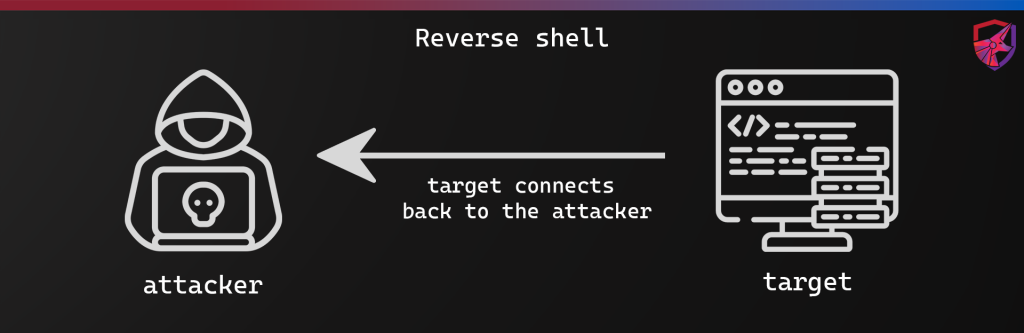
File Upload Vulnerabilities
- If you uploaded a reverse shell and can’t seem to find the directory it is in: leverage
gobusterreults or view source withCtrl + Uto find similar links for clues. - Bypass php extension checks by either using
.php7,.phtml, etc. - Bypass simple file extension checks by intercept and modify with
Burp Suite - Sometimes we can also make use of file sharing services to upload reverse shells if it has writing permissions and can access the web directory. For example we can use SMB, FTP, etc. to upload the shell and trigger it.
- Triggering reverse shells: usually triggered directly with web requests, but sometimes we can also leverage Local File Inclusion (LFI) to trigger reverse shell
More Web Service Tips
- Look at the source code of pages that doesn’t look like popular web services (such as Wordpress, Joomla, Jenkins, etc.) and look for hints for credentials or any clues, think of it as you are playing a detective game. If there are domain name information such as
test.htb, add that in your/etc/hostsfile and enumerate for subdomains withffuforgobuster vhosts - Leverage
niktoif needed, I personally didn’t find it too interesting. However, it can yield results for hints to initial access sometimes. - When enumerating a popular/well known web service, we can enumerate with their corresponding wordlists from seclists. e.g. we can search apache wordlists byand we can find the corresponding wordlist by
ls -R /usr/share/wordlists/seclists/Discovery/Web-Content | grep -i "apache"then we can use that wordlists withlocate Apache.txtgobusterorffuf - If the target webservice has
.git, we can usegit-dumperto dump git repositories which can leak crucial information - When testing for LFI vulnerabilities, try doing a lot of
../in requests with parameters such as?view=or?page= - When enumerating for Windows IIS servers, try enumerating with
.aspxand.aspif you can’t find anything with.phpextensions ingobuster
SSH Enumeration
This may become repetitive but it’s very important: try username:username of any usernames you found from other services to see if you can log in; try spraying passwords to other services too like FTP, etc. not limited to SSH.
Linux Privilege Escalation
I organized for a few major types of privilege escalation types, and I think if they are not in them it’s usually that I have to get creative. Linux PrivEsc is something that can be both fun and painful. I will exclude out some of the “common sense” ones (like sudo -l, SUID, etc.) and add ones I think I missed out a lot on:
- Look in web service config files for passwords to access database (typically
mysql) or spraying that password against users from/etc/passwd: such aswp-config.phpforwordpress. If you don’t know the config file, google[web service] default config locationor something similar - If we found passwords, we can also try using them in web services or other services to gain further access to potentially another user.
- Enumerating strange file in
/opt,/var, the mails if there is a mail service,/home/[user]of other users. Also, the.bash_history,.bashrc, etc. of users. - Enumerate our current user, we may have special user groups that can leverage special privilege escalation methodologies. Or that we belong to unusual group that can read/write on files that can only be read/write to that group. And also look in
env,history, etc. - Look in
/etc/passwd; and try username as password for users, again. - If we get to laterally move to another user, we may need to re-enumerate everything again (including
sudoprivileges,SUIDbit set programs, etc.)
Note: Linux PrivEsc can be quite tricky. However:
If we still cannot obtain root after double enumeration, I would try to leverage something more creative. This could include abuse modifying PATH variable with cronjobs, kernel exploits (not really more creative, but less often in current OSCP exams), etc.
Windows Privilege Escalation
In my opinion, pretty straight forward in OSCP. The hard part is credential hunting.
whoami /all: you should know how to abuse tokens such asSeImpersonate, etc.whoami /groups: abuse special groups such asService Operator,LAPS_Reader, etc.- Enumerate for
AlwaysInstallElevated: create.msimsfvenompayload - Insecure service permissions: learn
PowerUp.ps1andPrivescCheck.ps1- When making a
msfvenompayload, we generateexe-serviceinstead ofexe. We also might need to change to staged payload and catch withmsfconsoleif unstable. - Remeber:
SeShutdowntoken doesn’t need to be enabled to restart Windows - If we can’t restart with
CMDorPowerShellthen we can try usingRDPto log in and restart manually with the Windows button.
- When making a
- Check for ports hosted internally with
netstat -ano
If the above doesn’t work out, then it’s usually that we have to do credential hunting
- Search for credentials: in
PowerShell/CMDhistory, etc. Note: AD Chains 7 from Hacker Blueprint teaches a very detailed methdology for credential hunting
AD Tips:
- Practice
netexec! The absolute most useful tool in AD. It can basically do everything- Learn to make a user list with the output of
netexec smb(try--rid-brute) - Note down all of the passwords you collect, and spray them on all users.
- Spray the users list as passwords against all users
- Use
netexecto confirmwinrmorrdpprivileges (shows golden(Pwn3d!))
- Learn to make a user list with the output of
- Run bloodhound as soon as you finish with enumerating services, this can show a more detailed and clear attack path
- When using bloodhound: view domain admins and all of the “shortest paths”
- Bloodhound will give you hints on abusing misconfigured ACEs, but they are not copy and paste and sometimes you might need to do some debugging.
- Learn to enumerate
MSSQL: impersonate other users, code execution, NTLM capture, etc. hackviser has a good list of enumerations that is important in OSCP AD Set - Learn and practice how to search for credentials; like I stated in Windows PrivEsc section above, the AD Chains from Hacker Blueprint can be great to practice (especially Chain 7 and 8)
- Pivoting: not actually that complicated in OSCP,
ligol-ngis basically all you need. However, I prefer pivoting internally to a service of a machine withchisel - NTLM capturing is possible in a lot of scenerios when you can trick the target into accessing your kali machine; if cracking hashes seems impossible, try relaying it.
- Enumerate the
SYSVOLforcpasswordingroups.xml; decrypt withgpp-decrypt - After you got privileged shell on Windows, add a domain user as local admin and dump
LSASS,LSA,SAM, etc. withnetexec
Conclusion
Thank you all for coming this far, I might update the tips more along my cyber security journey but I truly believe that practice makes perfect. These tips might not be the most “detailed” since I didn’t show all of the commands to do certain tricks and tips, but I believe you will be able to learn how to do them easily with some research. In addition, if you have tried my tips and tried everything from your methodology and can’t find the way. Maybe it’s time to calm down and think for a moment, and try getting creative. I dislike the wording of OffSec’s way of saying “try harder”, because that feels like we are not trying hard and that’s simply not true. Sometimes we are just less experienced or not getting creative enough in my opinion.
Remember I failed twice before my pass, failing is not the end of the world and don’t let it affect your confidence. If you can’t pass the OSCP now doesn’t mean you won’t be the best penetration tester in the future. On my 100 points OSCP attempt, I got the last 20 points with something that I barely touched on before, but luck was on my side and something clicked in my head into pwn’ing the whole OSCP exam in just under 7 hours.
Last but not least, I wish all of you the best of luck, not just in you OSCP exam that’s coming up in 2 days, or maybe that you are doing the OSCP exam as of the very moment you are reading this line, but also your career. And this blog will conclude the end of my OSCP journey!
Feel free to reach out to my discord hiroto or on LinkedIn if you have any questions.
ON to the next.